What's on the school dashboard?
Reference · Updated
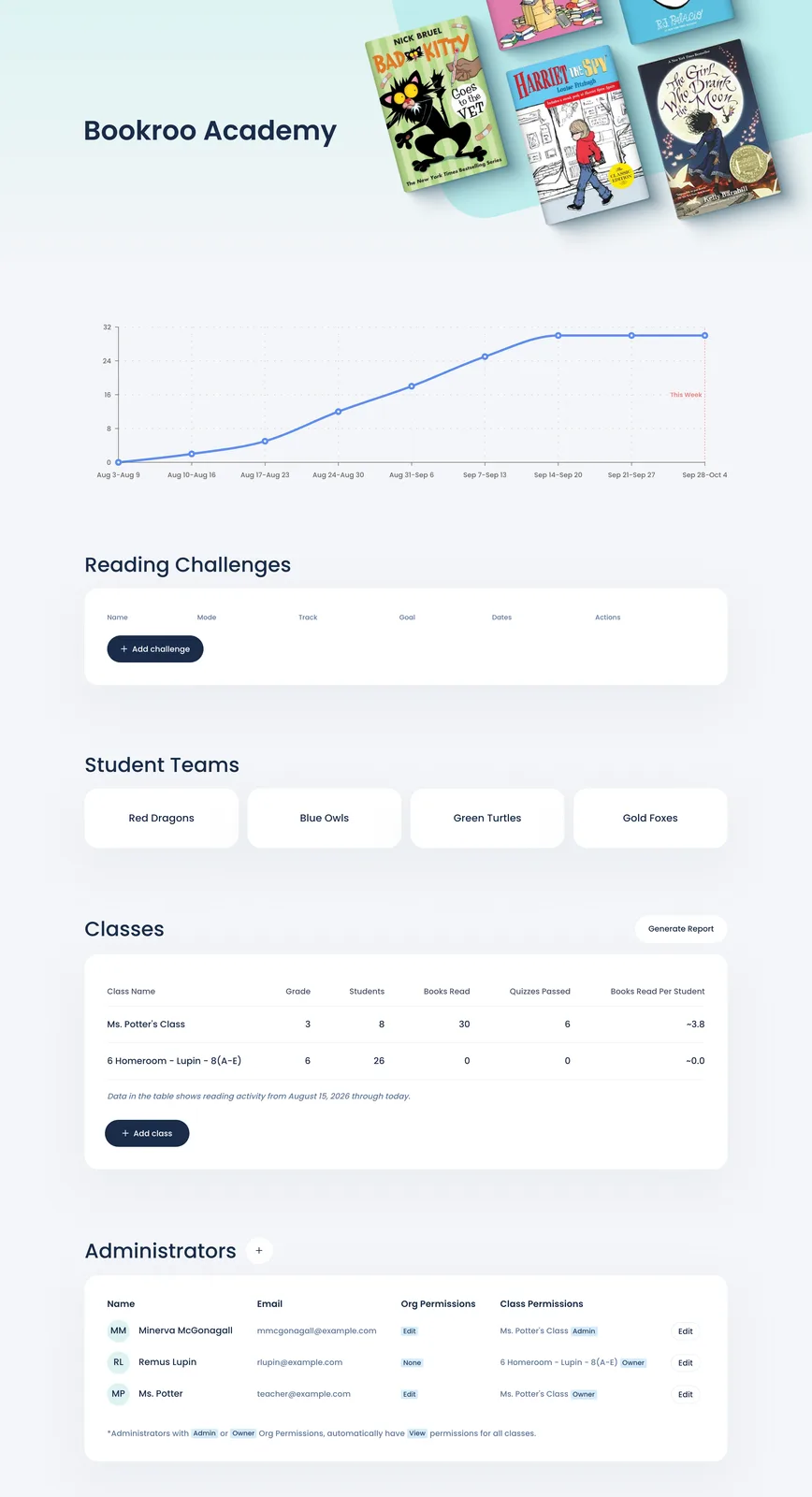
The school dashboard is one page covering every class at your school. Open it from Dashboard → Your places → your school's card (bookroo.com/dashboard/pod-orgs/…).
| Section | What it shows |
|---|---|
| Header | Your school's logo, website, and a chart of books read over time |
| Challenges Ready to Fulfill | Challenge prizes students have earned that someone still needs to hand out. Custom rewards are handed out in each class. |
| School challenges | Reading challenges that run across several classes |
| Student Teams | Your school's teams (houses) and their logos, if you use teams. See Student teams. |
| Classes | Each class with its Grade, Students, Books Read, Quizzes Passed and Books Read Per Student. Click a class to open it. |
| Generate Report (admins) | A spreadsheet of Individual students or Class aggregates for a date range and the classes you pick |
| Add class (admins) | Creates a class that belongs to the school |
| Unassigned (admins) | Students who joined the school without a class |
| Administrators (admins) | Who has access, and at what level. See Add teachers to your school. |
Still stuck?
Email us or book a call. A person on the Bookroo team will help.