How do reading levels and ZPDs work?
Explainer · Updated
A ZPD (Zone of Proximal Development) is a Lexile® range you set for a student: books hard enough to stretch them, but not too hard. It's optional. Until you set one, nothing changes for that student.
Where to see reading levels
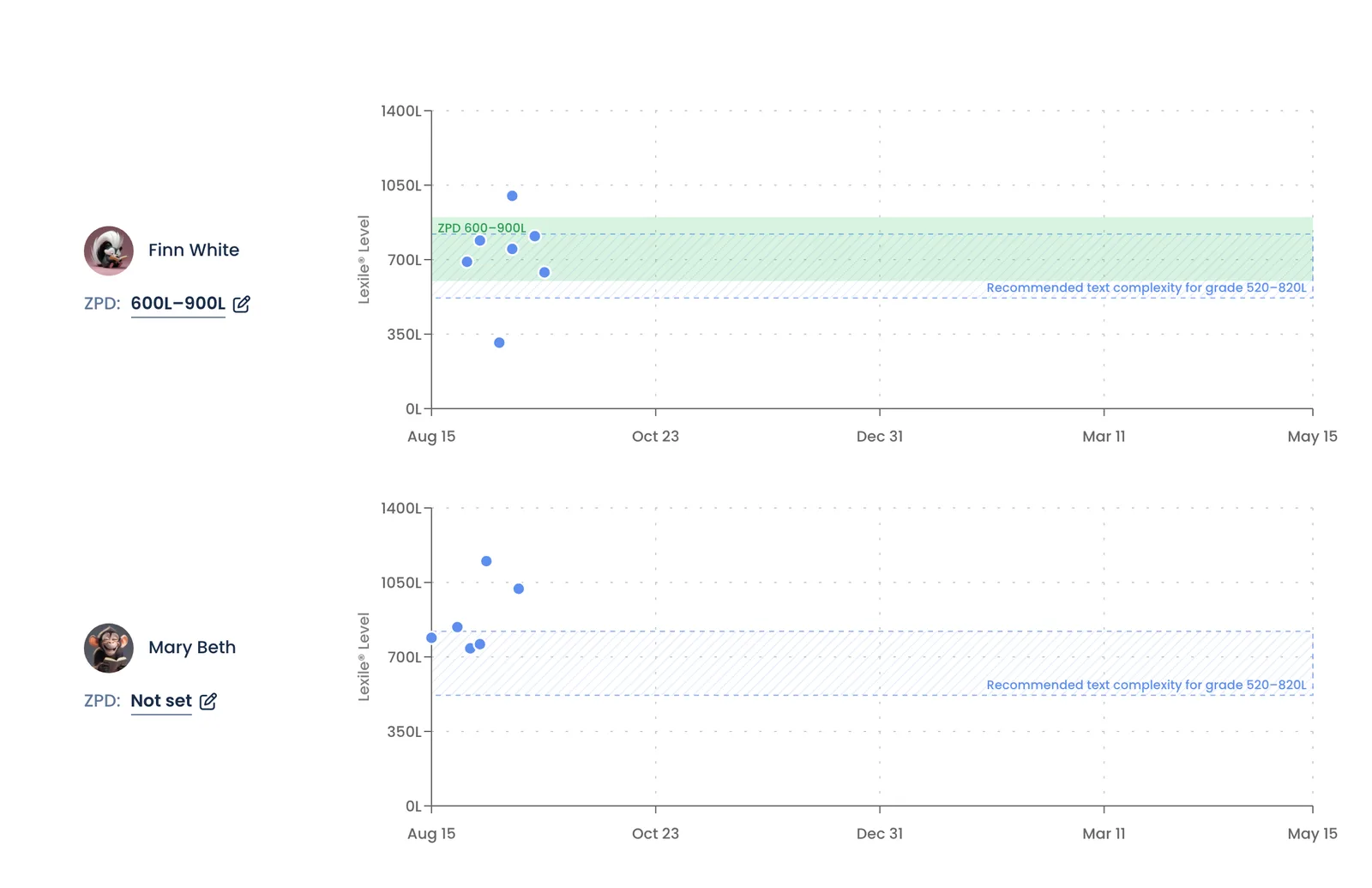
On your class Overview, the Reading Level Report card links to View all students. That opens Reading Levels & ZPD, with a timeline for each student:
- Each dot is a book they read, placed at its Lexile level.
- The blue band is the recommended text complexity for your class's grade.
- The green band is the student's ZPD, once you set one.
Accelerated Reader (AR) levels
A book's page shows its AR book level and AR points under Lexile in At a glance, with a link to its AR quiz when it has one. A student's quiz log, and the PDF from Export PDF, has AR level and AR pts columns.
When a book isn't in Accelerated Reader, Bookroo estimates both and marks them with ~. The level is converted from the book's Lexile measure. The points use Renaissance's formula: (10 + AR book level) × words ÷ 100,000. On a book page, the ⓘ beside an estimate says how it was worked out. ZPDs still use Lexile.
What a ZPD changes
When a student records reading, the book is compared with their current ZPD.
| Book | Points and gems |
|---|---|
| In the ZPD | Full |
| Below the ZPD | The percent you set under Books below the ZPD. It starts at 0%, which means no points. Books you admin certify earn full points. |
| Above the ZPD | Full, but only after the student passes the book quiz or you admin certify it |
| No known level | Full |
Students see a badge on each book: In your ZPD, Below your ZPD, Above your ZPD · ask your teacher or Level unknown · ask your teacher. A book's level comes from its Lexile measure. If it has none, Bookroo estimates the level and marks it est.
The quiz password
Require the monitor password to take the book quiz is on by default. It covers books above the ZPD and books with no known level. If your class has no Monitor Password (Settings → Book Quizzes), students can't start those quizzes at all. Set a password or untick the box. See A quiz won't start.
Setting a ZPD
- One student: click the range next to ZPD: (it says Not set at first). Enter Lexile min, Lexile max and a Starting date, then click Add. Suggested ranges by grade fills in a typical range.
- Several students: click Manage ZPDs, tick the students, then click Set ZPD for….
A new range takes effect on its start date, and older ranges stay in the student's history. Changing a ZPD doesn't re-score reading that's already recorded. A ZPD set by a family is ignored while the student is in your class.
Still stuck?
Email us or book a call. A person on the Bookroo team will help.