What do Reading Stats and the Activity Feed show?
Reference · Updated
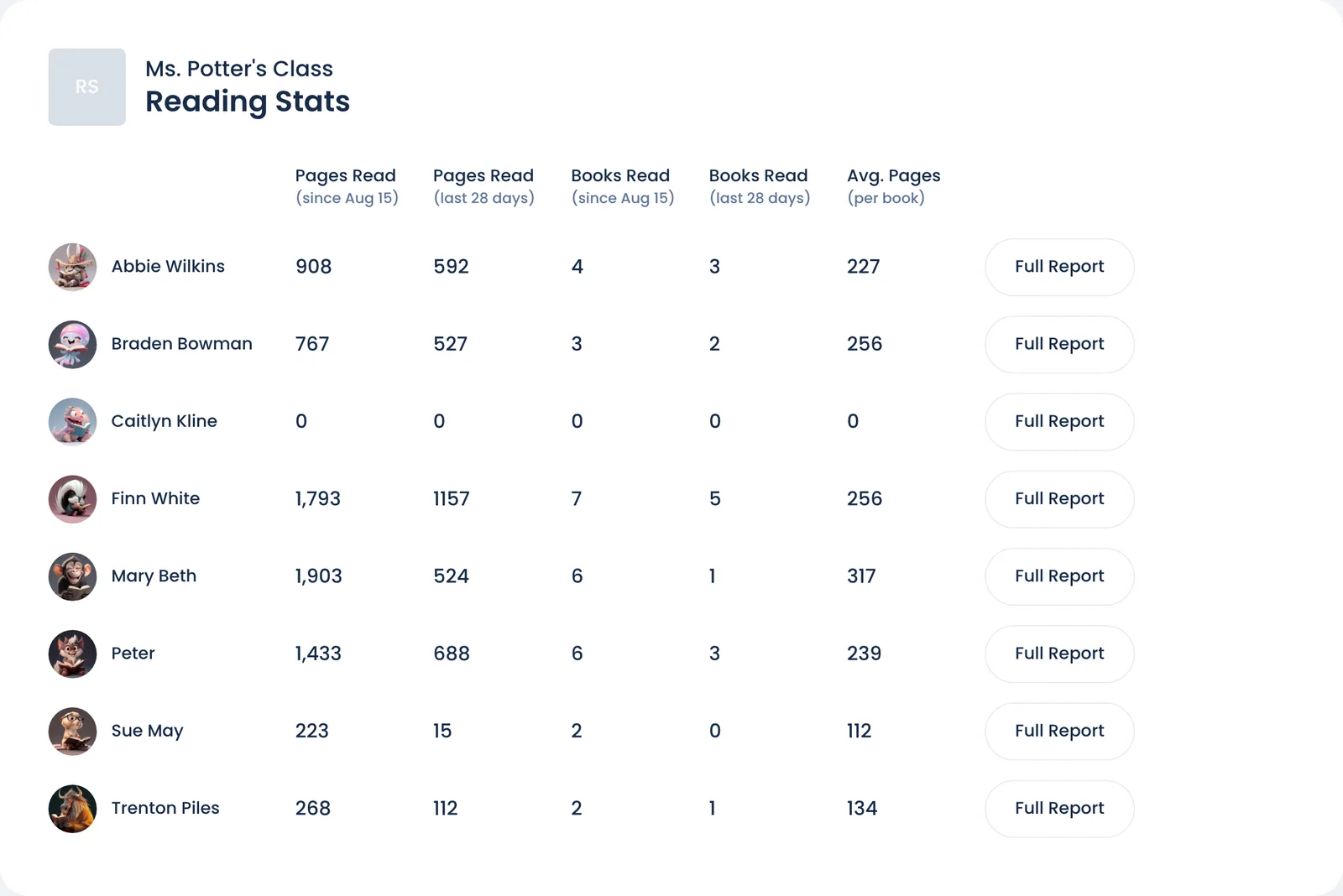
Reading Stats gives each student's totals since the class started. The Activity Feed lists the class's reading, entry by entry. Open both from your class Overview.
Reading Stats
Open it from the Reading Stats card on Overview by clicking View all students. The card shows the first three students; the page shows the whole class.
| Column | What it counts |
|---|---|
| Pages Read (since your class's start date) | All pages recorded, including books not finished yet |
| Pages Read (last 28 days) | The same, for the last 28 days |
| Books Read (since the start date) | Finished books, plus books logged in reading sessions. Books still waiting for a quiz or your certification don't count yet. |
| Books Read (last 28 days) | The same, for the last 28 days |
| Avg. Pages (per book) | Pages Read ÷ Books Read, since the start date |
| Full Report | Opens the student's reading report |
The start date is the Start Date in your class Settings.
Activity Feed
Open it from the Recent Reading Activity card on Overview with View more activity. The card shows the latest five finished books.
| Control | What it does |
|---|---|
| Dates | Opens on the last 7 days. Pick any range. |
| Previous / Next arrows | Move the whole range back or forward by its own length (a week at a time, by default) |
| Show only finished books | Hides pages-read and started entries |
| Show condensed view | Shows finished books as plain rows instead of cover cards |
Each row shows the Reader, Date, Status, Title, Page Reached, Pages and Minutes. The statuses are the same as in the reading log.
The feed is read-only. To change an entry, open that student's reading log.
Tip: in the Weekly Update card on Overview, the Week #… Finished Books link opens the feed on last week's finished books.
Still stuck?
Email us or book a call. A person on the Bookroo team will help.