What are student reflections, and where can I read them?
Reference · Updated
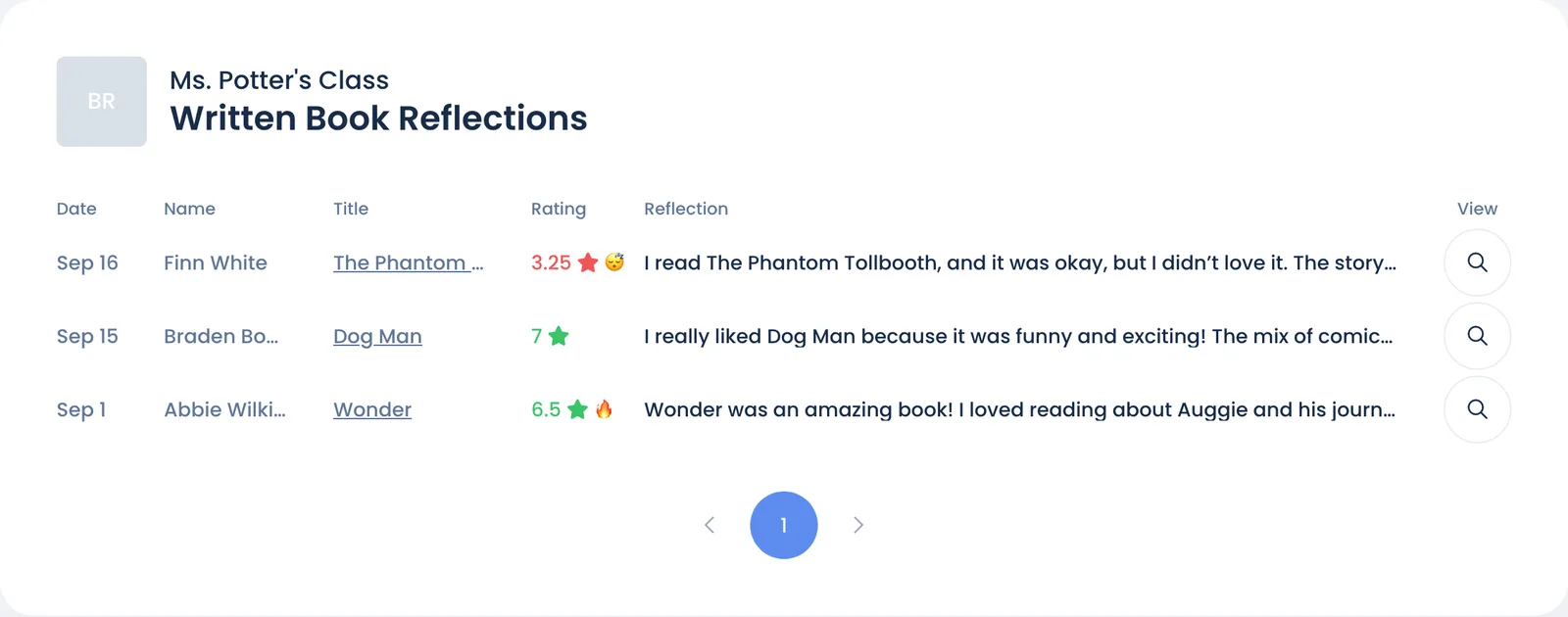
A reflection is a student's rating of a book they've read, plus anything they choose to write about it. You read the written ones on your class Overview, in the Recent Written Book Reflections card. Click View more reflections for all of them.
To have students write while they're still reading a book, see Reading notes.
What students fill in
Each book has a Reflect tab. The Quiz & Reflect button on a book opens it. The tab unlocks once the student has marked the book read.
| Part | What the student does |
|---|---|
| What do you think of this book? | Drags a slider from 1 to 7, from "I think this is a very poor book" to "This book is a stand out!" |
| This book left me feeling... | Picks Excited to read more!, Neutral or Less excited to read. Unlocks after the rating. |
| Add written reflection | Writes up to 2,048 characters. Reflection Ideas suggests prompts, like "What's one question you'd ask the author about the story?" Unlocks after the rating. |
Students can change any part later, or remove the whole thing with Delete reflection.
When students are asked
Reflections are always optional. Bookroo doesn't prompt after each book, and you can't assign or require them. Students find them through the Quiz & Reflect button, and Rate a book is one of the steps in the Getting Started checklist on their dashboard.
What students earn
| Action | Reward |
|---|---|
| Rating a finished book | Stones, about one per 50 pages, up to 5. Very short books earn none. |
| Writing a reflection | Nothing extra |
- A book waiting for a quiz or your certification earns its stones once it's passed or certified.
- Books below a student's ZPD earn the same reduced share of stones as of points.
- Students can earn up to 30 stones a week.
- Deleting a reflection takes its stones back.
Reflections never earn points.
What you can see and do
| Where | What's there |
|---|---|
| Recent Written Book Reflections card on Overview | The three newest written reflections |
| Class Book Reflections page (View more reflections) | Every written reflection, 10 to a page, newest first |
Each row shows the Date, Name, Title, Rating and the start of the Reflection. Next to the rating, 🔥 means the book left them excited to read more and 😴 means less excited.
- Click the magnifying glass under View to read the whole reflection.
- Click the student's name to open their page in your class.
- Click the title to see the book's Reflect tab as the student filled it in.
Good to know:
- Only reflections with writing are listed. A rating on its own doesn't show here.
- The list starts at your class's start date and includes reflections students write at home.
- The Date is when the reflection was last changed, so an edit moves it back to the top.
- You can't edit, delete or reply to a reflection. To remove one, sign in as the student and click Delete reflection on the book's Reflect tab.
- Until a student writes one, the card on Overview shows three sample reflections from "Student Z", "Student Y" and "Student X".
Notes while reading
A reflection waits until a student finishes a book. To have students write along the way too, turn on Reading Notes in your class Settings. They then get an optional notes box each time they update their progress, and you read the notes under While reading on the Class Book Reflections page. See How students write notes while they read.
Who can read a reflection
When students write, they see: "This reflection is only visible to you and any user accounts that you are connected to, such as a parent or teacher." In Bookroo, that means the student, the teachers of their classes and a family account linked to them. Everyone with access to your class can read the Class Book Reflections page, including View co-teachers. Reading notes are shared the same way, and students see "Your teacher can read your reading notes." as they write.
Still stuck?
Email us or book a call. A person on the Bookroo team will help.