How do I set a reading baseline for my class?
Step by step · Updated
A reading baseline is a small weekly or monthly reading goal for every student, such as 100 pages a week. It's a floor that builds a reading habit, not a stretch. For stretch goals, use a reading challenge.
Set or change the baseline
- On your class Overview, find the Reading Baseline Chart card and click View all students.
- On the Reading Baseline page, click Edit baseline.
- Choose the Interval: Weekly or Monthly.
- For a weekly baseline, choose the day the Week begins on. It starts on Monday.
- Under Track, choose Pages read or Books read, then enter the Quantity.
- Click Add (or Save if you're changing a baseline).
To turn the baseline off, click Edit baseline, then Remove goal.
Only the class owner and co-teachers with Admin access can change the baseline. A monthly baseline runs by calendar month.
What counts
| Track | What counts toward the week or month |
|---|---|
| Pages read | Pages recorded on those days: progress updates, finished books and reading sessions |
| Books read | Books finished on those days, plus the books in reading sessions |
- Reading counts on the date it was recorded for.
- All recorded reading counts, including books still waiting for a quiz or your certification.
- Minutes can't be tracked here. To track minutes, use a reading challenge.
Where progress shows
| Where | What it shows |
|---|---|
| Reading Baseline Chart card on Overview | The last 8 weeks (or months) for the first three students |
| Reading Baseline page | Every student, every week or month from your class's start date to its end date |
| Student Overview card on Overview | A Progress on Weekly Goal (or Monthly Goal) column for the current week or month |
| The student's dashboard, and their page in your class | A Weekly Goal (or Monthly Goal) progress bar on their profile card |
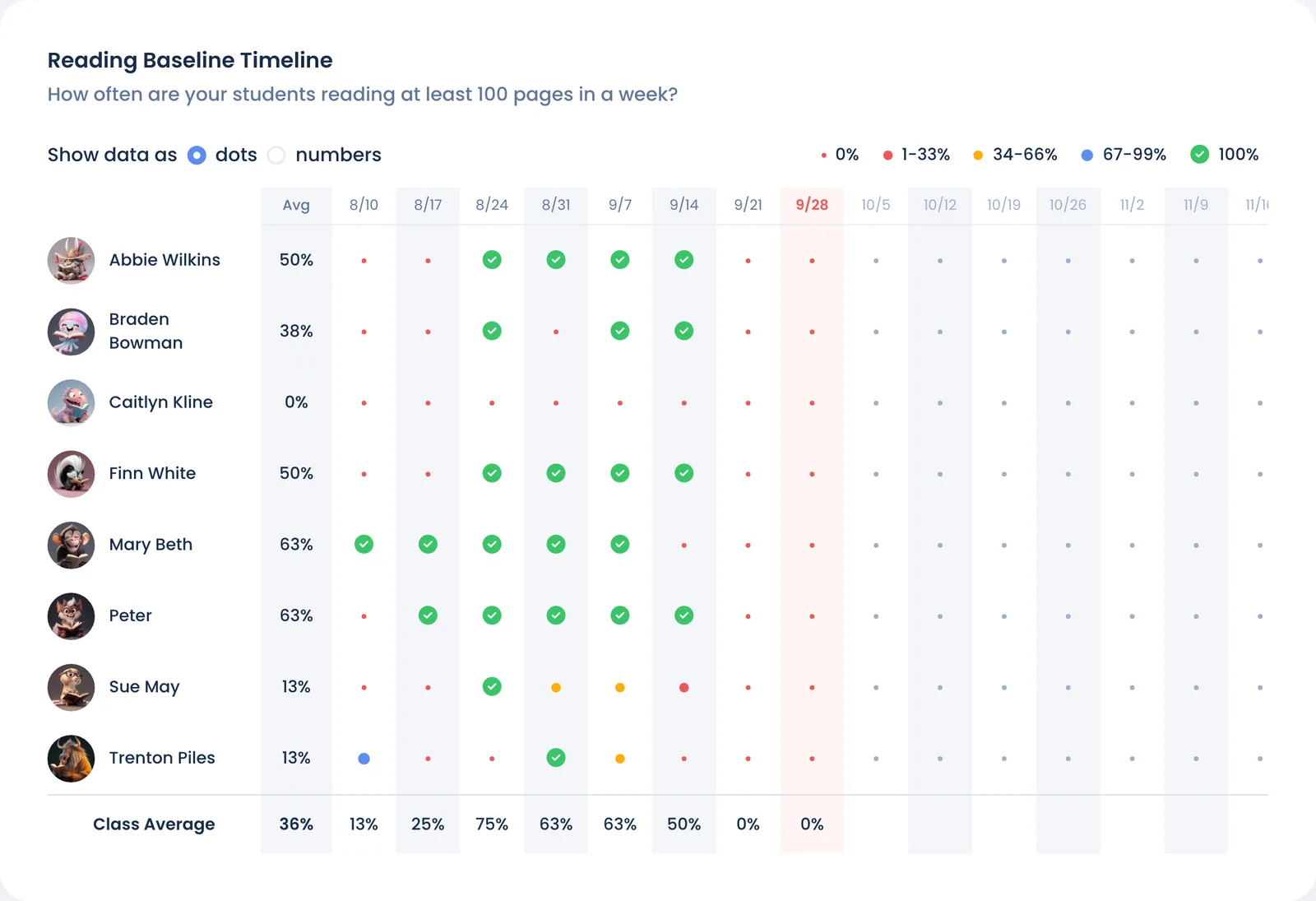
On the Reading Baseline page:
- Each dot is one week (or month). A green check means the student met the baseline. Smaller red, yellow and blue dots mean they got part of the way (0–33%, 34–66% and 67–99%). Today's week is highlighted.
- Show data as switches between dots and numbers (the percent of the baseline reached).
- Avg is the share of weeks each student met the baseline. The current week counts once they meet it, so an unfinished week never pulls the average down.
- Class Average is the share of students who met it, for each week and for the class overall.
Until you set a baseline, the chart on Overview shows a sample of 100 pages a week. The Student Overview column and the students' progress bars appear once you set one.
Still stuck?
Email us or book a call. A person on the Bookroo team will help.