What are stones, gems and the Word Vault?
Explainer · Updated
Stones, gems and the Word Vault are extra rewards on top of points. Students earn stones by rating books they've finished, polish them into gems to spend in the Rewards Shop, and fill their Word Vault with the words of every book they prove they read.
Stones
A student earns stones when they rate a book they've finished, on the book's Reflect tab. Rating first and finishing later works too. Longer books give more stones:
| Book length | Stones |
|---|---|
| Under 30 pages | 0 |
| 30–74 pages | 1 |
| 75–124 pages | 2 |
| 125–174 pages | 3 |
| 175–224 pages | 4 |
| 225 pages or more | 5 |
- Weekly cap: once a student has earned 30 stones in a week, further ratings that week earn none. The count resets with points, early Monday morning.
- Quiz before points: if a student's reading needs a quiz or your certification first, their stones wait until the book is certified. See Require a quiz before points.
- Books below a ZPD earn the same share of stones as of points, which starts at 0%. Certifying the book gives the full amount. See Reading levels and ZPD.
- Taken back: if the rating is deleted, or the reading loses its certification, the book's stones (or the gems they became) are removed.
Every student starts with one stone, so they can try polishing straight away.
Gems
Students click Polish next to their stones, at the top of the Rewards Shop or from the points badge under a finished book on their Reading Journey. In the Polish a stone window they rub the stone (or use Help me polish) until a gem appears. Polish another stone moves on to the next.
Each stone hides one of four gems. Rubies, emeralds and sapphires are equally common. Diamonds are the rarest, about 1 in 10.
Gems are spent like points. Many Rewards Shop items, such as bookmarks, postcards, coloring pages, trading card packs and 3D models, cost gems, on their own or with purple points. Avatars and sticker packs cost points only.
The Word Vault
The Word Vault is a student's running total of words from books they've proven they read. A book's words go in when the student passes its quiz, or when you Admin certify it (see Record or fix reading). Each book counts once. A word count starting with ~ is an estimate.
Words aren't spent. They unlock treasures as the total grows:
| Words | Title | Treasure |
|---|---|---|
| 10,000 | 1% Millionaire | The Garden Key |
| 100,000 | 10% Millionaire | Toad's Motor-Car |
| 250,000 | Quarter Millionaire | Aladdin's Copper Lamp |
| 1,000,000 | Millionaire | Jack's Gold Harp |
| 100,000,000 | 100 Millionaire | The Holy Grail |
There are 13 treasures in all. After passing a quiz, a student sees "Ready to add … words to your Word Vault?" and clicks Add Words to watch them go in. The words count either way. The button just plays the animation.
Students find their vault at the start of their Reading Journey: a card showing progress to the next treasure, with a Word Vault button. The card says Next Reading Level, but it's a word milestone, not a Lexile level.
Restart the count for a new school year
In Settings → Book Quizzes, tick Only count Word Vault words earned since the class start date. Nothing is erased: the card then shows "Since" the start date with the all-time total beside it, and students can still pick All time in their vault. A book already in the vault only counts again if you certify the re-read. See Start a new school year.
Where you see them
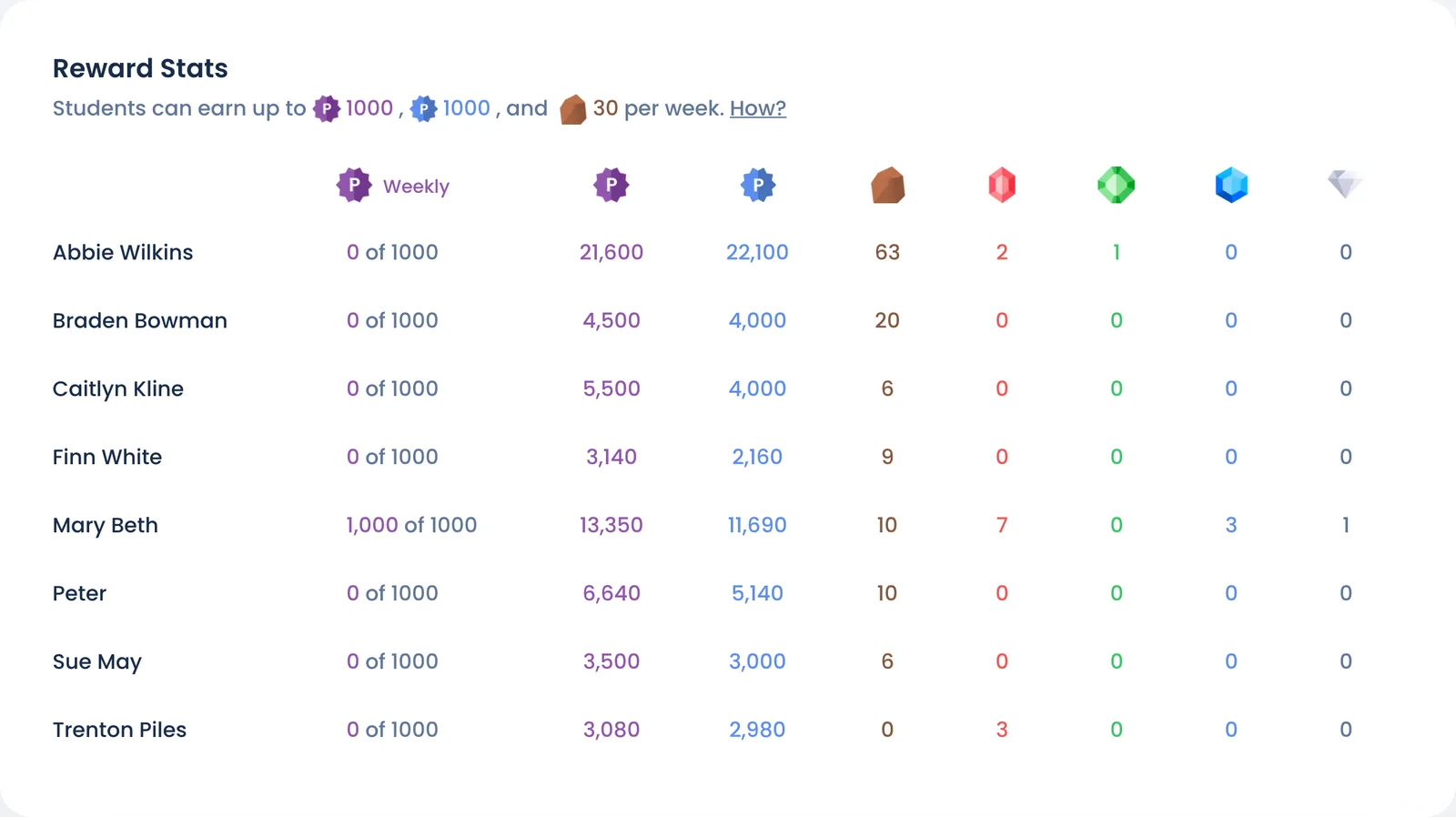
- Stones and gems: on Overview, the Rewards Shop Stats card shows each student's stones and each kind of gem. Click View all students for the whole class on the Rewards page.
- Word Vault: go to Roster → … next to a student → Sign in as student to see their vault. For a whole school, Words Added to Vault in the school report adds up words from passed quizzes. It leaves out books you certified, so it can be lower than students' own vaults.
Still stuck?
Email us or book a call. A person on the Bookroo team will help.